Snort IPS (Intrusion Prevention System)

In search of the Great Manifesto
Giới thiệu
Tiếp tục với phần trước của Snort IDS (Intrusion Detection System), Snort còn có thể hoạt động như một IPS (Intrusion Prevention System) để không chỉ phát hiện mà còn chủ động ngăn chặn các cuộc tấn công mạng theo thời gian thực. Ở chế độ này, Snort có khả năng phân tích gói tin đi qua, so sánh với tập luật (rules) và ngay lập tức chặn, loại bỏ hoặc thay đổi các gói tin được xác định là nguy hiểm trước khi chúng kịp gây ảnh hưởng đến hệ thống.
Mô hình
Có một số điểm khác biệt cơ bản giữa Snort ở chế độ IPS so với IDS. Đối với chế độ IDS, Snort thường được đặt ở vị trí có thể lắng nghe (sniff) được toàn bộ lưu lượng mạng cần giám sát. Thường là ở chế độ promiscuous trên card mạng, và lý tưởng nhất là ở trên một cổng mirror/SPAN của swtich hoặc qua một network TAP.
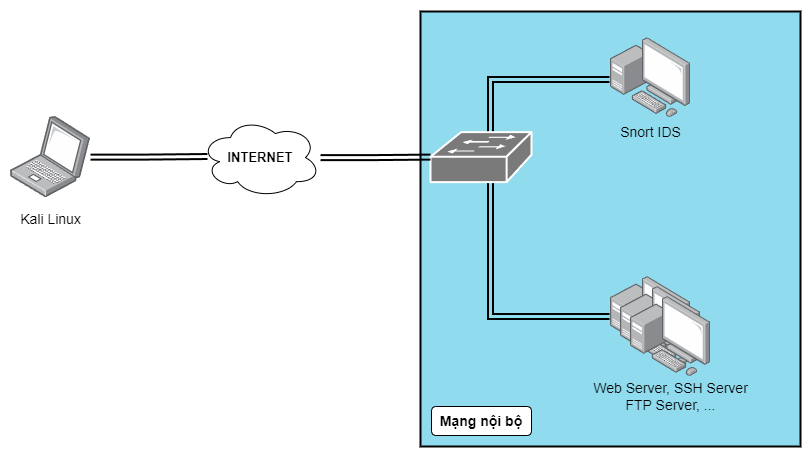
Trong khi đó, chế độ IPS của Snort yêu cầu toàn bộ lưu lượng mạng cần phải đi qua máy tính chạy Snort. Hình minh hoạ như sau:
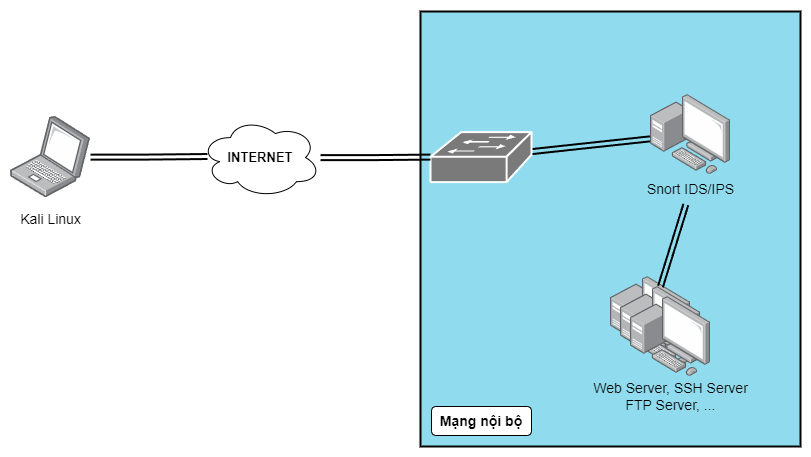
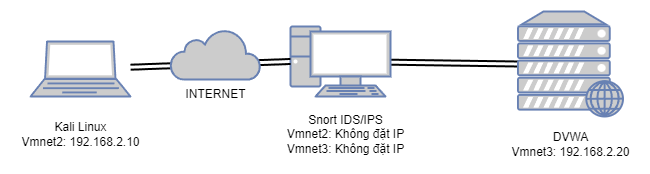
Chế độ inline mode của Snort sẽ tạo ra một transparent bridge giữa 2 interfaces. 2 interfaces này sẽ không được cấu hình IP và được cài đặt để chạy ở chế độ promiscuous. Bằng cách này, Snort có thể giám sát toàn bộ lưu lượng mạng và dựa vào các rules được cấu hình mà quyết định sẽ có cho phép các gói tin tiếp tục đi qua hay không.
Về cơ bản, các máy ảo sẽ được cấu hình như sau:
Cài đặt
Ở đây mình sẽ dùng Snort 3. Phần cài đặt thì về cơ bản cũng giống như Snort 2, nên mình sẽ không đi chi tiết. Đây là phiên bản Snort mình sử dụng:
root@neyugniat:/home/neyugniat# snort -V

   ,,_     -*> Snort++ <*-
  o"  )~   Version 3.9.3.0
   ''''    By Martin Roesch & The Snort Team
           http://snort.org/contact#team
           Copyright (C) 2014-2025 Cisco and/or its affiliates. All rights reserved.
           Copyright (C) 1998-2013 Sourcefire, Inc., et al.
           Using DAQ version 3.0.21
           Using libpcap version 1.10.4 (with TPACKET_V3)
           Using LuaJIT version 2.1.1703358377
           Using LZMA version 5.4.5
           Using OpenSSL 3.0.13 30 Jan 2024
           Using PCRE2 version 10.42 2022-12-11
           Using ZLIB version 1.3
Sử dụng netplan để cấu hình các interface cho Snort, tạo một file 99-snort-inline.yaml trong thư mục /etc/netplan như sau:
network:
  version: 2
  renderer: NetworkManager

  ethernets:
    ens33:
      dhcp4: true

    ens38:
      dhcp4: false
      link-local: []
      addresses: []
      optional: true

    ens39:
      dhcp4: false
      link-local: []
      addresses: []
      optional: true
Dùng lệnh sau để apply cấu hình netplan:
netplan apply
Chạy tiếp các lệnh sau để bật promiscuous mode và tắt GRO (Generic Receive Offload) và LRO (Large Receive Offload):
sudo ip link set dev ens38 promisc on
sudo ethtool -K ens38 gro off
sudo ethtool -K ens38 lro off

sudo ip link set dev ens39 promisc on
sudo ethtool -K ens39 gro off
sudo ethtool -K ens39 lro off
Kiểm tra cấu hình bằng:
3: ens38: <BROADCAST,MULTICAST,PROMISC,UP,LOWER_UP> mtu 1500 qdisc fq_codel state UP group default qlen 1000
    link/ether 00:0c:29:a5:45:2c brd ff:ff:ff:ff:ff:ff
    altname enp2s6
    inet 169.254.2.102/16 brd 169.254.255.255 scope link noprefixroute ens38
       valid_lft forever preferred_lft forever
    inet6 fe80::20c:29ff:fea5:452c/64 scope link
       valid_lft forever preferred_lft forever
4: ens39: <BROADCAST,MULTICAST,PROMISC,UP,LOWER_UP> mtu 1500 qdisc fq_codel state UP group default qlen 1000
    link/ether 00:0c:29:a5:45:36 brd ff:ff:ff:ff:ff:ff
    altname enp2s7
    inet 169.254.65.143/16 brd 169.254.255.255 scope link noprefixroute ens39
       valid_lft forever preferred_lft forever
    inet6 fe80::20c:29ff:fea5:4536/64 scope link
       valid_lft forever preferred_lft forever

ethtool -k ens38 | egrep 'gro|lro'
ethtool -k ens39 | egrep 'gro|lro'

rx-gro-hw: off [fixed]
rx-gro-list: off
rx-udp-gro-forwarding: off
rx-gro-hw: off [fixed]
rx-gro-list: off
rx-udp-gro-forwarding: off
Đảm bảo ip_forward cũng được tắt:
root@neyugniat:/home/neyugniat# sysctl -a | grep ip_forward
net.ipv4.ip_forward = 0
Tiếp đến sẽ cấu hình Snort trong file snort.lua :
-- 5. configure detection
daq = {
    modules = {
        {
            name = "afpacket",
            mode = "inline",
        }
    },
    inputs = { "ens38:ens39" },
    snaplen = 65535,
    batch_size = 64,
}

-- 7. configure outputs
alert_fast = {
    file = true,
}
Kiểm tra hoạt động
Thực hiện thử nghiệm rules:
alert icmp any any -> any any
(
    msg: "ICMP packet detected!!!";
    sid: 1000001;
    rev: 1;
)

drop icmp any any -> any any
(
    msg: "DROP - ICMP Ping of Death detected!";
    itype: 8;
    dsize: >2000;
    sid: 1000002;
    rev: 1;
)
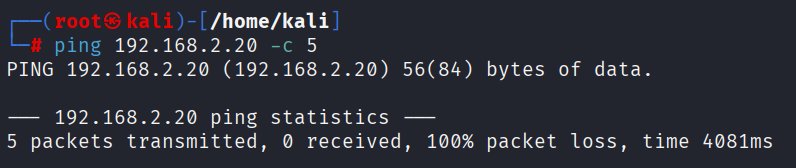
Khi chưa chạy Snort thì máy Kali sẽ không thể ping đến được máy DVWA:
Chạy Snort với câu lệnh sau:
snort -c snort.lua -R local.rules -Q -A alert_fast -l /var/log/snort/
Trong đó:
-c: File cấu hình.-R: Tập luật.-Q: Chạy Snort vớiinline mode.-A: Khai báo alert output mode.-l: Đường dẫn logging.
afpacket DAQ configured to inline.
Commencing packet processing
++ [0] ens38:ens39
Snort đang chạy ở mode inline trên ens38 và ens39. Thực hiện ping lại từ máy Kali đến máy DVWA:
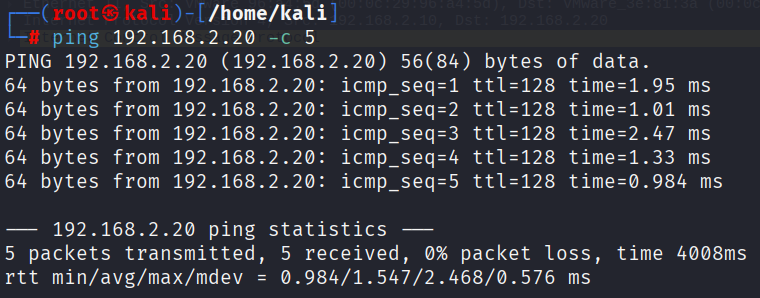
Lúc này thì đã có thể ping được, và Snort cũng đã detect được traffic:
root@neyugniat:/home/neyugniat# tail -f /var/log/snort/alert_fast.txt
09/18-14:58:30.460727 [**] [1:1000001:1] "ICMP packet detected!!!" [**] [Priority: 0] {ICMP} 192.168.2.10 -> 192.168.2.20
09/18-14:58:30.461329 [**] [1:1000001:1] "ICMP packet detected!!!" [**] [Priority: 0] {ICMP} 192.168.2.20 -> 192.168.2.10
09/18-14:58:31.462015 [**] [1:1000001:1] "ICMP packet detected!!!" [**] [Priority: 0] {ICMP} 192.168.2.10 -> 192.168.2.20
09/18-14:58:31.462588 [**] [1:1000001:1] "ICMP packet detected!!!" [**] [Priority: 0] {ICMP} 192.168.2.20 -> 192.168.2.10
09/18-14:58:32.463428 [**] [1:1000001:1] "ICMP packet detected!!!" [**] [Priority: 0] {ICMP} 192.168.2.10 -> 192.168.2.20
09/18-14:58:32.463920 [**] [1:1000001:1] "ICMP packet detected!!!" [**] [Priority: 0] {ICMP} 192.168.2.20 -> 192.168.2.10
09/18-14:58:33.465594 [**] [1:1000001:1] "ICMP packet detected!!!" [**] [Priority: 0] {ICMP} 192.168.2.10 -> 192.168.2.20
09/18-14:58:33.466337 [**] [1:1000001:1] "ICMP packet detected!!!" [**] [Priority: 0] {ICMP} 192.168.2.20 -> 192.168.2.10
09/18-14:58:34.468093 [**] [1:1000001:1] "ICMP packet detected!!!" [**] [Priority: 0] {ICMP} 192.168.2.10 -> 192.168.2.20
09/18-14:58:34.468665 [**] [1:1000001:1] "ICMP packet detected!!!" [**] [Priority: 0] {ICMP} 192.168.2.20 -> 192.168.2.10
Thử tăng kích thước của gói tin ICMP vượt qua ngưỡng tối đa cho phép được cấu hình cho Snort:
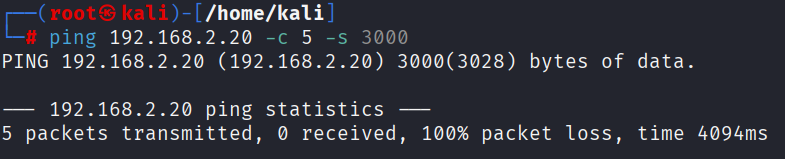
Các gói tin đã bị Snort DROP và không thể đến đích:
09/18-15:04:11.857026 [drop] [**] [1:1000002:1] "DROP - ICMP Ping of Death detected!" [**] [Priority: 0] {ICMP} 192.168.2.10 -> 192.168.2.20
09/18-15:04:12.878583 [drop] [**] [1:1000002:1] "DROP - ICMP Ping of Death detected!" [**] [Priority: 0] {ICMP} 192.168.2.10 -> 192.168.2.20
09/18-15:04:13.902422 [drop] [**] [1:1000002:1] "DROP - ICMP Ping of Death detected!" [**] [Priority: 0] {ICMP} 192.168.2.10 -> 192.168.2.20
09/18-15:04:14.926607 [drop] [**] [1:1000002:1] "DROP - ICMP Ping of Death detected!" [**] [Priority: 0] {ICMP} 192.168.2.10 -> 192.168.2.20
09/18-15:04:15.950565 [drop] [**] [1:1000002:1] "DROP - ICMP Ping of Death detected!" [**] [Priority: 0] {ICMP} 192.168.2.10 -> 192.168.2.20
Nmap Scan
Trước khi có các rules ngăn chặn quét Nmap:
nmap -sS -T4 192.168.2.20 --host-timeout 30s
Starting Nmap 7.95 ( https://nmap.org ) at 2025-09-18 11:00 EDT
Nmap scan report for 192.168.2.20
Host is up (0.0011s latency).
Not shown: 996 filtered tcp ports (no-response)
PORT     STATE SERVICE
80/tcp   open  http
443/tcp  open  https
3306/tcp open  mysql
3389/tcp open  ms-wbt-server
MAC Address: 00:0C:29:3E:81:3A (VMware)
Sau khi apply các rules để ngăn chặn Nmap:
nmap -sS -A -T4 192.168.2.20 --host-timeout 30s
Starting Nmap 7.95 ( https://nmap.org ) at 2025-09-18 11:39 EDT
Nmap scan report for 192.168.2.20
Host is up (0.00089s latency).
Skipping host 192.168.2.20 due to host timeout
OS and Service detection performed. Please report any incorrect results at https://nmap.org/submit/ .
Nmap done: 1 IP address (1 host up) scanned in 30.65 seconds
Log thu được từ Snort:
09/18-22:40:00.807468 [drop] [**] [1:1000102:1] "DROP - SYN scan detected" [**] [Priority: 0] {TCP} 192.168.2.10:45773 -> 192.168.2.20:1086
09/18-22:40:00.908084 [drop] [**] [1:1000102:1] "DROP - SYN scan detected" [**] [Priority: 0] {TCP} 192.168.2.10:45771 -> 192.168.2.20:8009
09/18-22:40:01.008257 [drop] [**] [1:1000102:1] "DROP - SYN scan detected" [**] [Priority: 0] {TCP} 192.168.2.10:45773 -> 192.168.2.20:8009
09/18-22:40:01.108866 [drop] [**] [1:1000102:1] "DROP - SYN scan detected" [**] [Priority: 0] {TCP} 192.168.2.10:45771 -> 192.168.2.20:3351
09/18-22:40:01.210176 [drop] [**] [1:1000102:1] "DROP - SYN scan detected" [**] [Priority: 0] {TCP} 192.168.2.10:45773 -> 192.168.2.20:3351
09/18-22:40:01.310762 [drop] [**] [1:1000102:1] "DROP - SYN scan detected" [**] [Priority: 0] {TCP} 192.168.2.10:45771 -> 192.168.2.20:3551
09/18-22:40:01.411643 [drop] [**] [1:1000102:1] "DROP - SYN scan detected" [**] [Priority: 0] {TCP} 192.168.2.10:45773 -> 192.168.2.20:3551
09/18-22:40:01.512530 [drop] [**] [1:1000102:1] "DROP - SYN scan detected" [**] [Priority: 0] {TCP} 192.168.2.10:45771 -> 192.168.2.20:5050
09/18-22:40:01.612527 [drop] [**] [1:1000102:1] "DROP - SYN scan detected" [**] [Priority: 0] {TCP} 192.168.2.10:45773 -> 192.168.2.20:5050
Tuy nhiên, cần phải lưu ý rằng nếu ta cấu hình rate limit quá nhỏ, Snort hoàn toàn có thể nhận nhầm cái gói tin và drop cả những gói không đến từ việc dò quét cổng.
Lấy ví dụ: Nếu ta để Snort drop các gói TCP đến từ cùng 1 source khi vượt quá 30 gói trong 30 giây (1 gói/s), người dùng có khả năng sẽ không thể truy cập được vào trang web. Vì mình gặp vấn đề này khi để rate limit 40 gói/10 giây. Vậy nên mình đã dùng Wireshark để xem thông số khi một máy Kali thực hiện dò quét cổng:

Thấy được khoảng 2,920 gói trong 27 giây, cho là khoảng 100 gói/s. Dựa vào đây mình có thể viết rule để alert và drop Nmap scan, dĩ nhiên sẽ cần nhiều số liệu và thống kê hơn để có thể hoàn thiện các rules nhằm phát hiện, ngăn chặn dò quét cổng được chính xác hơn.
Brute Force
┌──(root㉿kali)-[/home/kali/Documents/snort_testing]
└─# hydra 192.168.2.20 http-get-form "/dvwa/vulnerabilities/brute/:username=^USER^&password=^PASS^&Login=Login:H=Cookie\\: PHPSESSID=vm9k6q15fh99eic069ju1hq1cs; security=low:F=Username and/or password incorrect." -l admin -P password
Hydra v9.5 (c) 2023 by van Hauser/THC & David Maciejak - Please do not use in military or secret service organizations, or for illegal purposes (this is non-binding, these *** ignore laws and ethics anyway).

Hydra (https://github.com/vanhauser-thc/thc-hydra) starting at 2025-09-21 09:14:24
[INFORMATION] escape sequence \: detected in module option, no parameter verification is performed.
[WARNING] Restorefile (you have 10 seconds to abort... (use option -I to skip waiting)) from a previous session found, to prevent overwriting, ./hydra.restore
[DATA] max 16 tasks per 1 server, overall 16 tasks, 1991 login tries (l:1/p:1991), ~125 tries per task
[DATA] attacking http-get-form://192.168.2.20:80/dvwa/vulnerabilities/brute/:username=^USER^&password=^PASS^&Login=Login:H=Cookie\: PHPSESSID=vm9k6q15fh99eic069ju1hq1cs; security=low:F=Username and/or password incorrect.
[STATUS] 261.00 tries/min, 261 tries in 00:01h, 1740 to do in 00:07h, 6 active
[ERROR] all children were disabled due too many connection errors
0 of 1 target completed, 0 valid password found
[INFO] Writing restore file because 2 server scans could not be completed
[ERROR] 1 target was disabled because of too many errors
[ERROR] 1 targets did not complete
Hydra (https://github.com/vanhauser-thc/thc-hydra) finished at 2025-09-21 09:15:42
- Nhìn chung thì Snort đã được cấu hình để chạy trong chế độ inline-mode và có thể phát hiện cũng như ngăn chặn một số hình thức dò quét cơ bản, mình sẽ tiếp tục nghiên cứu thêm về cách viết rules, cách phát hiện và ngăn chặn các cuộc tấn công nâng cao, tinh vi hơn. Mặt khác, có thể sử dụng fail2ban để hoạt động song song với Snort ở chế độ IDS thay vì chỉ dựa vào Snort IPS.